
Twitch: Live Streaming
Twitch Interactive, Inc.Entertainment
4.3247.57K Reviews
- Version
- Varies With Device
- Installs
- 100.00M
- Age Rating
- Teen
Screenshots
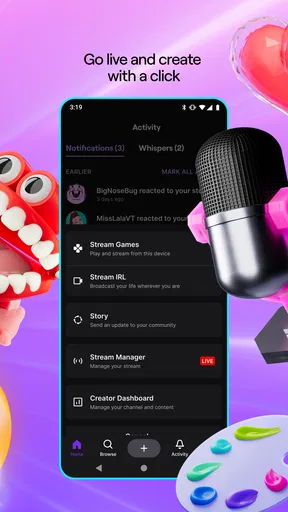
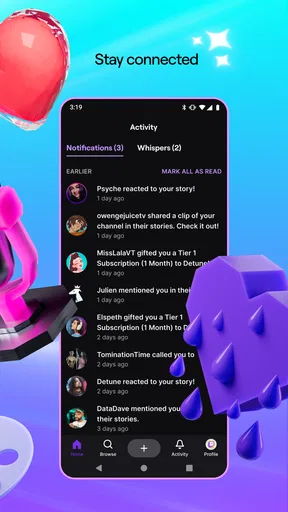
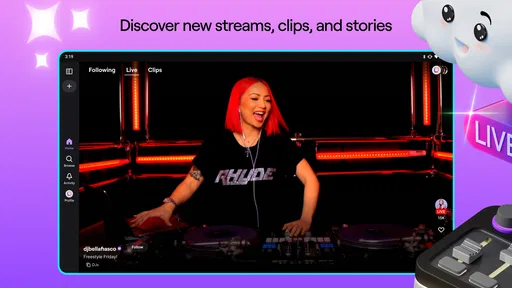
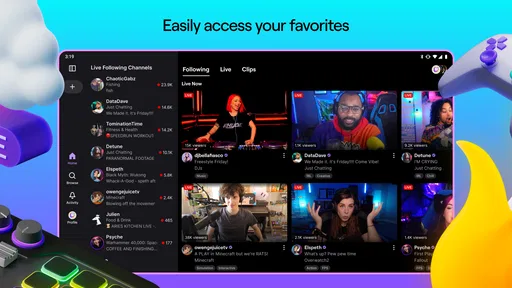
Our Review of Twitch: Live Streaming
 Analysis by Appyee
I usually open Twitch with a particular itch to scratch: I want to see something happening now, not choose another polished video whose ending is already fixed. That makes it feel different from a conventional entertainment app. A stream can be a game, a drawing session, a cooking attempt, a music performance, or a conversation, and the appeal often comes from watching it unfold alongside other people. Twitch: Live Streaming is free to install, but its experience makes the most sense when I treat it as a collection of live communities rather than an endless video shelf.
That distinction is useful before you sign in. If I want a short, edited clip that gets straight to the point, another video platform may be a better fit. If I have time to settle in, follow a creator’s routine, and occasionally join the conversation, Twitch has a stronger reason to be on my phone. Its focus is live entertainment, and that focus shapes both its best moments and its rough edges.
Choosing a stream that fits the moment
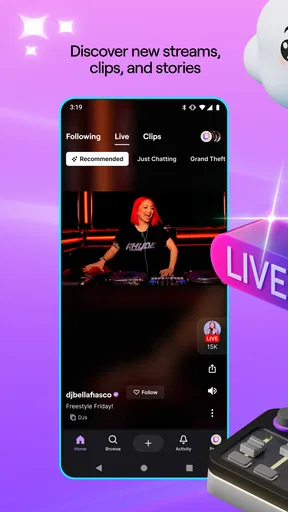
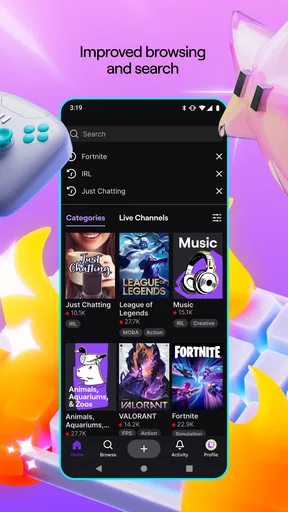
My first step is deciding how much attention I can give. A game stream can work in the background while I make dinner; an art demonstration or a fast-moving chat usually rewards looking at the screen. Twitch spans gaming and other interests, so I can move between very different kinds of live programming without treating the app as a gaming-only destination.
For a first visit, I would start with a topic I already enjoy and sample a few channels rather than expect the home screen to understand me immediately. Recommendations become more useful as my viewing habits give them a clearer signal. A practical tip is to leave quickly when a stream is not a match instead of letting it play out of politeness: what I choose to watch helps shape what I see next, and a short trial is enough to decide whether the room’s pace suits me.
The app is published by Twitch Interactive, Inc., and it sits in the entertainment category. Its average rating is 4.0 from around 5.7 million ratings, with about 243,000 written reviews and more than 100 million installs. Those figures suggest a well-established audience, but they do not guarantee that every channel will feel welcoming or that every stream will suit my taste. The app is rated Teen, which is worth keeping in mind when choosing what younger viewers watch.
Following the live experience
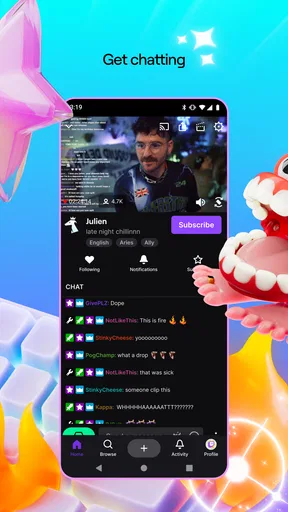
Once I find a channel I like, the main difference from ordinary on-demand video becomes obvious: the stream is happening with other viewers in the room. Chat can make a quiet broadcast feel social, especially when the streamer responds to messages, but it can also move too quickly to follow. I get more out of it when I read the room first, notice its pace, and join only if I have something relevant to add.
That small pause is a useful habit for newcomers. Each channel has its own tone, shorthand, and expectations, so a message that makes sense in one community may land awkwardly in another. I would not assume that every streamer reads every comment; the live format is engaging precisely because it is shared, but a busy chat is not a one-to-one conversation. Watching without typing is a perfectly good way to get comfortable.
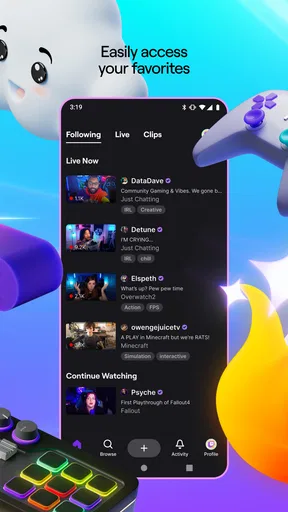
There is also a choice between being a casual viewer and becoming a regular. Following a channel makes it easier to return to creators I enjoy, while a subscription is a paid way to support a channel and may include benefits such as ad-free viewing or channel-specific emotes. I would treat subscribing as optional, not as the price of entry. The app is free, while optional in-app purchases range from about a dollar to around $1,598 per item; that broad range is a reminder to check the exact purchase and its purpose before confirming anything.
When live does not fit your schedule
Live viewing can conflict with work, sleep, time zones, or simply the rest of the day. Past broadcasts, often called VODs, help bridge that gap: if a channel has a replay available, I can watch later instead of reorganizing my evening around a broadcast. That is a meaningful advantage over live-only viewing, although a replay does not recreate the feeling of being there while the chat and streamer react together.
For a realistic use case, imagine I have a free half-hour after dinner and want something more companionable than another episode of a show. I might open a channel I already follow, watch a game or a relaxed chat while I eat, and leave when I need to get on with the evening. If I miss a longer broadcast, I can look for its replay when I have more time. This works best when I choose a channel in advance; browsing without a plan can consume the whole half-hour without giving me the satisfying session I wanted.
Compared with short-form video feeds, Twitch asks for more patience and offers less control over pacing: a live moment may take a while to arrive, but the unfolding conversation can be the point. Compared with subscription streaming services, it feels less like selecting a finished series and more like dropping into a public room. For edited tutorials, films, or videos I need to search and revisit precisely, I would pick an on-demand service. For a creator’s live reaction, an ongoing event, or the loose company of a chat, Twitch is the more natural choice.
Practical choices that improve a session
I get a better experience by matching the stream to what I am doing rather than treating every broadcast as something that deserves full-screen attention. A familiar channel can provide gentle background company, while a new game or detailed creative process is easier to follow when I can watch closely. If I am on a limited data connection or a crowded network, video quality and buffering may become more noticeable; moving to a steadier connection or choosing a less demanding viewing setup can help, though it cannot fix every network problem.
Another useful trade-off is chat visibility. Chat is part of what makes Twitch distinct, but it can compete with the stream itself. When messages are moving too quickly, I can focus on the video rather than trying to read every line. In a slower room, chat may be the best part of the visit. I would judge a channel by whether its pace and interaction suit me, not by assuming that more messages automatically mean a better community.
For people who like discovering creators, the range is a strength; for anyone who gets decision fatigue, it can be a burden. I recommend starting with a small number of channels that genuinely interest you and returning to them before branching out. That gives recommendations a more useful foundation and keeps the app from becoming an endless hunt for something to watch. If I only want a specific answer or a concise how-to, searching for an edited guide elsewhere is usually quicker than waiting for the right moment in a live broadcast.
Where the handoffs can break
A Twitch session often moves through several stages: I find a stream, decide whether to stay, watch and perhaps join chat, then either follow the channel or return later for a replay. Each handoff involves a choice. Recommendations can help me discover something, but they can also lead me toward content that is popular rather than personally relevant. Following a creator I trust is a more reliable route back than expecting every visit to produce a perfect recommendation.
The biggest friction is the unpredictability of live content. A stream may be quiet when I arrive, the most interesting moment may have passed, or the chat may be too busy for a newcomer to feel comfortable. Buffering can interrupt the flow, and a broad catalogue can make browsing feel like work. These are not reasons to avoid the app, but they do mean I should use it when I am open to an unscripted experience rather than when I need a guaranteed, neatly paced result.
I would also be selective about purchases. A subscription can be a satisfying way to support a creator I watch regularly, but occasional viewers may get plenty from free viewing. Since paid options vary, I would check the displayed price and benefits before tapping. That is a simple way to avoid mistaking a channel perk for a requirement to participate.
Who will get the most from it
Twitch suits people who enjoy watching events unfold and do not mind that the best moment may take time. It is especially appealing if you already follow a streamer, like the social side of live chat, or want to explore interests beyond gaming. Creators’ regular schedules and familiar communities can make a return visit feel more personal than opening a random video feed.
I would steer away from it if you need every video to be concise, predictable, and easy to search by exact subject. It may also be a poor fit if rapid chat feels stressful or if you tend to lose track of time while browsing. In those cases, a carefully chosen on-demand video or a scheduled, finite program gives you more control. Younger viewers should make choices with the Teen content rating in mind and use appropriate adult guidance.
As an app, Twitch has been available since May 20, 2015, and its large audience shows how firmly live streaming has become part of everyday entertainment. Still, scale is not the same as personal fit. I would judge it by whether I find a few channels worth returning to, not by how long I can keep scrolling or how many communities I join.
My overall recommendation is to try it with a specific interest and a modest plan: choose one live channel, give it a little time, and decide whether the creator and chat make the experience better for you. If they do, following that channel and catching a replay when schedules clash can turn a casual visit into a useful routine. If not, there is no need to force the social side. The strongest reason to keep Twitch is the feeling of sharing a moment as it happens; when that is what you want, few entertainment apps make that the centre of the experience.
What’s the Buzz About?
Twitch: Live Streaming is more than just an app; it’s a platform where gamers, artists, and enthusiasts unite to share their passions. Whether you’re a hardcore gamer, a creative soul, or just someone looking for engaging content, Twitch offers a little something for everyone.
Streaming isn’t just about playing games anymore. On Twitch, you can catch live music performances, cooking shows, talk shows, and even some wild "just chatting" sessions where anything goes. It’s like a real-time TV channel that’s tailored to your interests.
Getting Started
Jumping into Twitch is as easy as pie. Downloading the app on your Android or iOS device is a breeze. Once installed, you’ll be greeted by a user-friendly interface that’s intuitive and easy to navigate. Just create an account or log in with your existing credentials, and you’re all set to explore.
The homepage is where the magic begins. It’s like a buffet of streams tailored to your interests, thanks to its smart algorithm that learns from what you watch. I found this incredibly handy because it saved me the time of sifting through countless streams to find something I’d actually enjoy.
Features You’ll Love
The live chat feature is one of Twitch’s shining stars. It’s where viewers can engage with the streamer in real-time, making the experience interactive and personal. This isn’t just passive watching; it’s a two-way street. Plus, it’s a great way to meet like-minded folks.
Another cool feature is the ability to subscribe to your favorite channels. Subscriptions support streamers financially and unlock additional perks like ad-free viewing, exclusive chat emotes, and more. It’s a win-win for both sides.
And let’s not forget about the VODs (Video on Demand) feature. Missed a live stream? No worries. You can catch up on past broadcasts at your leisure. This is perfect for those of us who can’t always catch the live action due to time zone differences or hectic schedules.
Community Vibes
What truly sets Twitch apart is its sense of community. It’s not just about watching; it’s about belonging. You’ll find a welcoming atmosphere where everyone’s passion is celebrated. The community is diverse, inclusive, and downright friendly. I’ve made some fantastic friends just by engaging in chatrooms and participating in community events.
Streamers often host special events and collaborations, bringing viewers together for some unforgettable experiences. Whether it’s a charity stream or a massive gaming tournament, there’s always something exciting happening on Twitch.
Room for Improvement?
Like any app, Twitch isn’t without its quirks. Some users have reported occasional buffering issues, but these are usually tied to individual internet connections rather than the app itself. Also, with such a vast amount of content, it can sometimes feel overwhelming to new users.
However, Twitch is continually evolving, and the development team is proactive in addressing issues and rolling out updates to improve user experience. So, any hiccups are usually short-lived.
Final Thoughts
So, is Twitch: Live Streaming worth your time? Absolutely. Whether you’re there for the gaming, the creativity, or simply the community vibes, Twitch offers a dynamic experience that’s hard to find elsewhere. It’s a hub where entertainment and community come together seamlessly.
If you’re ready to explore a world of live streaming where the fun never ends, head over to your app store and give Twitch a whirl. Trust me, you’ll be hooked in no time!
Privacy and Permissions
See what permissions an app requests and how it handles your data.
- Identity
- find accounts on the device
- Contacts
- find accounts on the device
- Photos/Media/Files
- read the contents of your USB storage, modify or delete the contents of your USB storage
- Storage
- read the contents of your USB storage, modify or delete the contents of your USB storage
- Camera
- take pictures and videos
- Microphone
- record audio
- Wi-Fi connection information
- view Wi-Fi connections
- Other
- view network connections, change network connectivity, full network access, change your audio settings, run at startup, draw over other apps, control vibration, prevent device from sleeping
Verdict
Strengths of Twitch: Live Streaming
- User-friendly interface that's easy to navigate.
- Extensive community with diverse content creators.
- Real-time interaction with streamers via chat.
- Variety of streaming categories beyond gaming.
- Seamless integration with other social media platforms.
Limitations of Twitch: Live Streaming
- Advertisements can be intrusive during streams.
- High data usage on mobile networks.
- Some features locked behind paid subscriptions.
- Occasional latency issues in video streaming.
- Limited parental controls for younger users.
Similar Picks in This Category
View All
Google Play Games
Google LLC3.9

Netflix
Netflix, Inc.4.8

YouTube Kids
Google LLC4.2

Disney+
Disney4.4

Prime Video
Amazon Mobile LLC4.7

Steam
Valve Corporation3.2
Frequently Asked Questions
What platforms can I use to access Twitch?
Twitch is accessible on multiple platforms, including Android and iOS for mobile devices, as well as Windows and macOS for desktops. Additionally, you can watch streams through web browsers on any device. This flexibility ensures you can enjoy Twitch from virtually anywhere, whether at home or on the go.
Is there a cost to using Twitch, or is it free?
Twitch is free to use, allowing users to watch streams and interact with communities without any cost. However, Twitch offers a subscription model called Twitch Prime, which provides ad-free viewing, exclusive emotes, and other perks. Users can also support streamers through donations or subscribing to their channels.
How can I start streaming on Twitch?
To start streaming on Twitch, you'll need to create an account and download streaming software like OBS Studio or Streamlabs. Once set up, you can link your Twitch account to the software. Make sure to have a stable internet connection and a decent webcam and microphone for the best streaming experience.
Are there any age restrictions for using Twitch?
Yes, Twitch requires users to be at least 13 years old. Users between 13 and 18 should have parental permission to use the service. Twitch's community guidelines are strict about age restrictions, and users must comply to avoid having their accounts suspended or banned.
How can I ensure my safety and privacy on Twitch?
To maintain safety and privacy on Twitch, set your privacy settings to control who can interact with you. Be cautious about sharing personal information on streams or in chat. Utilize Twitch's block and report features to handle harassment or unwanted interactions effectively, ensuring a secure experience.
